
How to set up affiliate tracking
Influencers, gym coaches, happy regulars: people who love your food can bring you customers, and affiliate tracking rewards them for it. Your site works with Tapfiliate, so every order a partner sends your way is tracked and their commission is worked out for you.

Step 1: create a Tapfiliate account
Sign up for your own account at Tapfiliate.
During setup, Tapfiliate asks whether you want lifetime or recurring commissions, where a partner earns on every future order from the customers they bring. If you want either, choose the Smart (connected) option; your site then tracks each customer and triggers a commission for every payment.
Step 2: copy your Account ID
In your Tapfiliate dashboard, open your profile at the bottom left and choose Profile Settings.
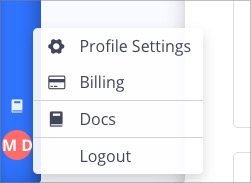
Scroll to the bottom and copy your Account ID.

Step 3: add it to your site
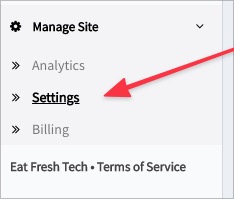
Go to Manage Site > Integrations and click Manage Tapfiliate. (You can also find the same Tapfiliate Account Id setting under Manage Site > Settings.)

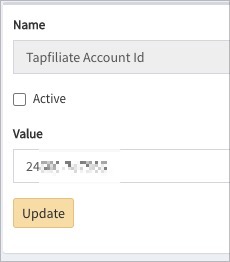
Paste your Account ID, tick Active, and click Update. Tracking only starts while Active is ticked.
The change needs a site publish; the page tells you, the publish runs on our side, and a refresh afterwards shows it. See How to edit admin settings.
Step 4: give it a test run
- Have someone sign up as an affiliate through your Tapfiliate link.
- Have someone else follow that affiliate's link and place an order.
- Check your Tapfiliate dashboard: the order and the affiliate's commission should be there.
Keywords: referral tracking
Related